

Queue Management Software in Qatar
In today’s world, efficiency is the backbone of customer experience. Whether it’s a bank, hospital, retail store, government office, airport, or service center — customers expect prompt, organized, and stress‑free service. Long queues and disorganized waiting areas are not just frustrating — they directly impact customer satisfaction, employee productivity, and revenue.
This is where a Queue Management Software (QMS) comes into play.
Axle Systems is a trusted supplier of advanced Queue Management Software designed to streamline client flow, reduce wait times, boost operational efficiency, and elevate the overall service experience.
What Is Queue Management Software?
Queue Management Software is a digital solution that helps organizations control and organize the flow of people waiting for service. It replaces traditional manual systems — such as physical lines, token slips, and verbal coordination — with a smart, automated and data‑driven platform.
In practice, Queue Management Software allows customers to check‑in, receive a token, and wait for their turn in a structured and predictable way. It also gives staff and managers real‑time insights into customer wait times, service performance, peak hours, staffing needs, and other critical performance metrics.
This software can be deployed in many forms, including:
- Digital kiosks for self‑check‑in
- Mobile apps for virtual queuing
- SMS and WhatsApp alerts
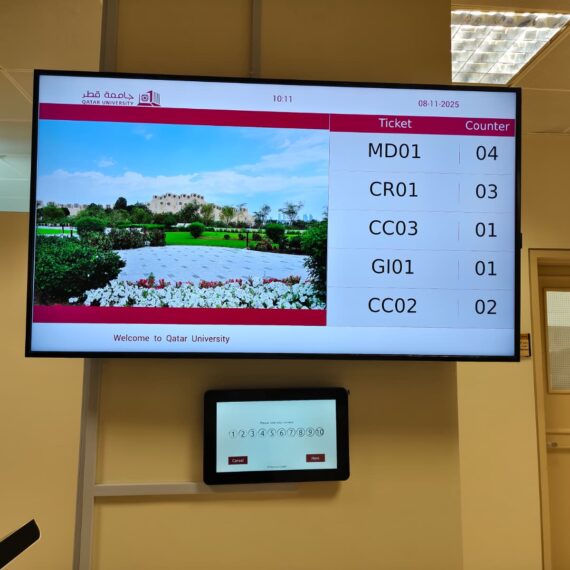
- Dashboard displays
- Integration with service counters and staff notifications
- Reporting tools
At its core, Queue Management Software increases transparency, reduces congestion, and transforms waiting time into a pleasant and predictable experience.
Why Queue Management Software Matters Today
Everyone hates waiting in long lines — but in many organizations, queues are unavoidable.
Whether you run a busy retail store during peak season, a busy hospital emergency room, a government department serving citizens, or a bank with hundreds of clients per day — how you manage the queue determines:
✔ Customer impressions and satisfaction
✔ Staff productivity
✔ Service efficiency
✔ Operational cost
✔ Brand reputation
Modern customers expect:
- Fast service
- Fair treatment
- Clear communication
- Minimal waiting stress
- Digital and contactless solutions
Queue Management Software makes all this possible — and helps your business thrive in a competitive landscape.

Core Features of Queue Management Software
A robust Queue Management Software (QMS) does much more than just issue tickets. It’s a complete digital ecosystem designed to improve service efficiency, customer satisfaction, and operational insights. Let’s dive deeper into each feature, along with real-life examples and additional sub-features.
1. Digital Ticketing & Token System
Instead of using traditional paper slips, a Queue Management Software issues digital tokens or tickets. These tokens:
- Are unique and traceable, eliminating confusion or disputes over turn order.
- Can be generated through multiple channels, including kiosks, mobile apps, SMS, and websites.
- Include additional information like service type, counter number, estimated waiting time, and priority level.
Example: In a hospital, a patient registering at a self-service kiosk automatically receives a token indicating “Consultation – Doctor A, Counter 3, Number 24”. This not only organizes the queue but also provides clarity to both staff and patients.
Sub-features:
- Customizable numbering formats (alphanumeric codes, sequential numbers).
- Multi-service token generation (e.g., bank customers can choose “Deposit” or “Loan Assistance” service).
- Integration with appointment schedules to match pre-booked slots.
2. Virtual Queuing (Remote Queueing)
Virtual queuing allows customers to join a queue remotely and reduces physical crowding. Customers can:
- View current queue length and estimated wait times.
- Receive notifications via SMS, WhatsApp, or mobile app when their turn approaches.
- Reserve a time slot ahead of arrival.
Example: At a government office, citizens can join the queue online from home, reducing waiting area congestion and ensuring social distancing.
Sub-features:
- QR code check-in for contactless entry.
- Optional remote cancellations or rescheduling of queue slots.
- Real-time updates on service delays or counter changes.
3. Real-Time Dashboard & Analytics
Managers and supervisors get access to a centralized dashboard displaying live queue data:
- Number of customers currently waiting.
- Average and maximum waiting times.
- Performance of each service counter.
- Alerts for overcrowding or staffing gaps.
Example: A bank branch manager notices that Counter 2 is consistently overloaded between 2 PM and 4 PM. Using the dashboard, they reassign staff dynamically, balancing workloads efficiently.
Sub-features:
- Customizable KPIs (key performance indicators).
- Historical reporting to identify trends and peak hours.
- Integration with staffing schedules to optimize workforce allocation.
4. SMS, Email & App Notifications
Automated notifications keep customers informed and reduce uncertainty:
- SMS & email alerts: Customers get updates like “Your token #A123 is being served at Counter 3”.
- Mobile app notifications: Allow push notifications with real-time updates.
- Alerts for queue delays or changes, keeping the experience transparent.
Sub-features:
- Multi-channel notification support.
- Customizable message templates (branding, language, and tone).
- Feedback requests after service completion.
5. Multi-Channel & Multi-Location Support
Modern organizations often have multiple service counters, branches, or departments. Queue Management Software handles:
- Separate queues for different services or counters.
- Centralized management across all locations.
- Cross-location reporting to compare performance metrics.
Example: A retail chain with 10 branches can monitor queue statistics centrally, identifying which branches need more staff during peak hours.
Sub-features:
- Cloud-based management for remote oversight.
- Multi-branch token synchronization.
- Role-based access for staff, supervisors, and managers.
6. Priority & Special Services Handling
Certain customers or cases require priority service. Queue Management Software can:
- Assign VIP, senior citizen, or emergency tokens.
- Automatically prioritize critical cases without disrupting other queues.
- Provide separate counters or service channels for priority handling.
Example: In a hospital, emergency patients get immediate attention while non-urgent appointments wait, all managed digitally for transparency.
Sub-features:
- Customizable priority rules (by age, service type, or membership).
- Integration with service-level agreements (SLAs) to ensure compliance.
- Automated escalation if priority customers are waiting too long.
7. Reporting & Data Analytics
Beyond immediate Queue Management Software, the software provides detailed insights:
- Average wait time per counter, day, or department.
- Service efficiency and staff performance metrics.
- Customer feedback and satisfaction trends.
Example: A utility company can analyze peak demand times, plan staffing, and reduce wait times by using data from previous months.
Sub-features:
- Exportable reports in multiple formats (PDF, Excel).
- Custom dashboards for executives and managers.
- Predictive analytics to forecast high-demand periods.
8. Integration With Existing Systems
Queue Management Software can integrate with CRM, ERP, appointment scheduling, and other operational systems. Benefits include:
- Seamless data flow across platforms.
- No duplicate entry of customer information.
- Improved operational efficiency.
Example: When a customer books a hospital appointment online, the QMS automatically generates a token and updates the hospital’s internal system.
Sub-features:
- API support for third-party software.
- Integration with mobile apps and web portals.
- Automated synchronization of customer profiles and appointments.
Benefits of Queue Management Software
Implementing Queue Management Software (QMS) offers far-reaching benefits for both organizations and customers. Beyond simply reducing wait times, it enhances operational efficiency, customer satisfaction, staff performance, and data-driven decision-making. Here’s a detailed look at the key benefits:
1. Reduced Waiting Time
One of the most immediate benefits of a Queue Management Software is shorter and more predictable waiting times:
- Customers no longer wait aimlessly in long lines.
- The system dynamically distributes customers to available service counters.
- Virtual queuing allows customers to wait remotely, freeing up physical space.
Example: A busy hospital reduced patient waiting time by 40% after introducing a queue management system, allowing staff to handle more patients efficiently.
Sub-benefits:
- Real-time updates on queue progression.
- Prioritization of urgent cases without affecting overall flow.
- Alerts to staff when queues get long, enabling quick response.
2. Improved Customer Satisfaction
Customers value fairness, transparency, and predictability. A Queue Management Software ensures:
- Every customer is served in the correct order.
- Accurate estimated wait times are displayed, reducing anxiety.
- Notifications keep customers informed, enhancing the overall experience.
Example: A bank using a Queue Management Software saw 30% higher customer satisfaction scores, as clients no longer complained about line confusion or missed turns.
Sub-benefits:
- Reduced complaints and disputes over service order.
- Enhanced perception of professionalism and reliability.
- Improved likelihood of repeat business or loyalty.
3. Enhanced Staff Productivity
Staff can focus on serving customers efficiently instead of managing physical queues:
- Automatic token generation eliminates manual registration.
- Staff are notified when new customers arrive at their counter.
- Managers can monitor workload and allocate resources dynamically.
Example: At a retail store, employees reported less stress and higher efficiency after the introduction of Queue Management Software because they no longer had to call out numbers or manage disorganized lines.
Sub-benefits:
- Better allocation of staff during peak hours.
- Fewer interruptions and distractions.
- Reduced staff burnout and turnover.
4. Optimized Resource Allocation
Queue Management Software provides real-time insights that help managers optimize resources:
- Identify peak hours and allocate additional counters or staff.
- Track average service times for each counter.
- Ensure staffing levels match customer demand.
Example: A government office used analytics from Queue Management Software to reduce peak-hour congestion by 50% by adding temporary counters during morning rush hours.
Sub-benefits:
- Prevents idle staff during low-demand periods.
- Reduces operational costs by improving efficiency.
- Supports evidence-based decision-making.
5. Fair and Transparent Service
Queue Management Software eliminates human bias in service:
- Every customer is served according to a fair, digital order.
- Priority handling (VIPs, elderly, emergency) is systematically applied without favoritism.
- Customers can see the queue status in real-time, eliminating disputes.
Example: A hospital implemented priority codes for emergency cases while still maintaining fairness for regular patients — complaints about favoritism dropped dramatically.
Sub-benefits:
- Increases trust in the organization.
- Ensures compliance with service-level agreements (SLAs).
- Supports regulatory requirements for fairness in public services.
6. Data-Driven Insights
Queue Management Software collects valuable operational data, enabling informed decisions:
- Historical reports reveal peak hours, slow-performing counters, and customer flow patterns.
- Predictive analytics forecast future demand, helping managers prepare in advance.
- Customer feedback integrated into the system highlights service improvement areas.
Example: A utility company analyzed QMS data to identify days with high service demand and adjusted staffing, resulting in 20% faster average service times.
Sub-benefits:
- Identifies inefficiencies and bottlenecks.
- Facilitates continuous improvement and quality control.
- Supports strategic planning for expansion or resource management.
7. Increased Operational Efficiency
By automating queue processes, businesses see a measurable increase in overall efficiency:
- Automated ticketing reduces human errors.
- Real-time monitoring allows quick adjustments to service counters.
- Multi-location management ensures consistent service across branches.
Example: A retail chain implemented Queue Management Software in multiple stores, resulting in faster customer flow, less congestion, and consistent service standards across all branches.
Sub-benefits:
- Reduced overhead costs.
- Streamlined workflows for staff and managers.
- Enhanced capacity to handle peak demand without extra infrastructure.
8. Reduced Physical Crowding
Physical queues often create safety and comfort issues:
- Virtual queuing allows customers to wait remotely, reducing congestion.
- Real-time queue updates prevent overcrowding in waiting areas.
- Contactless check-ins improve hygiene and safety.
Example: During a vaccination drive, patients waited virtually from home, eliminating overcrowding and maintaining social distancing guidelines.
Sub-benefits:
- Improves health and safety compliance.
- Enhances customer comfort.
- Supports COVID-19 or other health safety protocols.
Benefits of Choosing Axle Systems’ Queue Management Software
Selecting the right Queue Management Software (QMS) is critical for maximizing operational efficiency, improving customer experience, and gaining actionable insights. Axle Systems provides a fully-featured, reliable, and customizable Queue Management Software that stands out in the market. Here’s why businesses choose Axle Systems:
1. Faster Customer Throughput
Axle Systems’ Queue Management Software ensures that customers are served quickly, efficiently, and fairly:
- Automated ticketing and smart queue routing reduce idle time at service counters.
- Dynamic counter allocation ensures that available staff are immediately assigned to waiting customers.
- Virtual queueing allows customers to join remotely, reducing physical waiting and improving service flow.
Example: A bank using Axle Systems Queue Management Software reduced average wait time from 25 minutes to 12 minutes, enabling staff to serve more clients during peak hours without additional personnel.
Sub-benefits:
- Increased service capacity without additional infrastructure.
- Reduced customer frustration and complaints.
- Optimized flow for high-volume days or seasonal peaks.
2. Cost-Effective Solutions
Investing in Axle Systems’ Queue Management Software provides enterprise-level technology without unnecessary costs:
- Software can be scaled according to business size and needs.
- Reduced staffing and operational inefficiencies save money over time.
- No need for complex hardware — the system works with kiosks, mobile devices, and digital displays.
Example: A retail chain implemented Queue Management Software across 5 branches and saved over 20% in operational costs by reducing manual Queue Management Software and unnecessary staff hours.
Sub-benefits:
- Flexible licensing models to suit budgets.
- Minimal hardware investment required.
- Reduces wastage caused by manual ticketing systems or mismanaged queues.
3. Technical Support & Training
Axle Systems ensures that clients are supported at every step, from implementation to day-to-day operations:
- Full onboarding and training for staff and managers.
- Ongoing technical support for troubleshooting and software updates.
- Guidance on customizing the system for unique workflows.
Example: A hospital implemented the system in multiple departments, and Axle Systems provided on-site training for staff, resulting in a smooth transition and zero operational downtime.
Sub-benefits:
- Staff can confidently use the system without stress.
- Faster adoption reduces learning curves.
- Ensures maximum ROI from the software.
4. Tailored for Your Industry
Every business or service has unique needs, and Axle Systems customizes the software to meet them:
- Banks: Token systems for deposits, withdrawals, and loan services.
- Hospitals: Department-specific queues with emergency priority handling.
- Retail: Checkout lines, customer support desks, and return counters.
- Government Offices: Multi-department service integration with pre-booked appointments.
Example: A busy government office integrated Queue Management Software to manage citizen services and document processing efficiently, with separate queues for permits, passports, and complaints.
Sub-benefits:
- Ensures the system is relevant and useful for your specific workflow.
- Supports unique service-level agreements (SLAs) or regulatory requirements.
- Adapts as your business evolves or expands.
5. Future-Ready Technology
Axle Systems’ Queue Management Software is designed for modern, digital-first environments:
- Mobile apps, online portals, and kiosks support digital and remote queueing.
- Real-time dashboards provide analytics and reporting for smart decision-making.
- Integrates easily with CRM, ERP, and appointment systems to future-proof your workflow.
Example: A hospital integrated virtual queueing via mobile apps and digital kiosks, reducing physical crowding and ensuring health safety compliance during peak flu season.
Sub-benefits:
- Prepares your organization for digital transformation.
- Supports remote, hybrid, or multi-branch operations.
- Ensures longevity of investment with regular software updates.
6. Enhanced Customer Experience
By implementing Axle Systems’ Queue Management Software, your organization shows commitment to customers’ time and convenience:
- Fair and transparent service order reduces disputes and confusion.
- Real-time notifications and digital tokens keep customers informed and engaged.
- Feedback collection tools allow customers to share satisfaction insights, enabling continuous improvement.
Example: A bank introduced feedback-based optimization after implementing Axle Systems Queue Management Software and saw a 20% improvement in customer satisfaction scores within three months.
Sub-benefits:
- Builds trust and loyalty with customers.
- Creates a professional, modern service environment.
- Encourages repeat visits and positive word-of-mouth.
7. Scalability & Multi-Location Support
Axle Systems’ Queue Management Software is scalable to multiple branches, service counters, and departments:
- Centralized dashboard for managing all locations.
- Real-time monitoring ensures consistent performance across sites.
- Easy expansion as business grows or new service lines are introduced.
Example: A retail chain scaled the system from 3 stores to 15 stores, maintaining the same high-quality service and reporting metrics across all locations.
Sub-benefits:
- Future-proof solution for growing businesses.
- Consistent customer experience across all locations.
- Centralized control reduces managerial overhead.
8. Reliable & Secure
Axle Systems prioritizes data security, reliability, and compliance:
- Secure storage of customer and operational data.
- Compliance with privacy and data protection regulations.
- Minimal downtime, ensuring smooth service at all times.
Example: A telecom service center used Axle Systems Queue Management Software across 10 branches without experiencing downtime or data breaches, maintaining uninterrupted customer service.
Sub-benefits:
- Protects sensitive customer and organizational information.
- Builds trust and credibility with clients and regulators.
- Reduces risk of operational disruptions.

Frequently Asked Questions (FAQ) About Queue Management Software
1. What exactly is Queue Management Software?
Queue Management Software is a digital system that organizes and manages the flow of people waiting for service. It replaces manual lines with automated ticketing, queue prioritization, live tracking, and data analytics.
2. How does virtual or remote queueing work?
Customers can join the queue remotely using a mobile app, SMS link, or online portal. They receive estimated wait times and notifications, reducing the need to physically wait in line.
3. Can this software handle priority cases?
Yes. The system supports priority and special service codes — such as senior citizens, VIPs, emergency patients — ensuring fair and controlled treatment.
4. What industries use Queue Management Software?
It’s widely used across healthcare, banking, retail, government services, airports, hospitality, education, utilities, and more.
5. Will this software integrate with our existing systems?
Yes. Axle Systems provides integration with CRM, appointment management, and other operational systems.
6. Is training provided?
Absolutely. We provide full onboarding, training, and ongoing support.
7. Do customers need to install an app to use the queue?
Not always. They can also check‑in via kiosk, SMS link, or online portal — no app installation required unless preferred.
8. How secure is customer data?
With Axle Systems, data privacy and compliance are a priority. All customer data is stored securely and processed in accordance with best practices.
9. Can the software work in multiple branches?
Yes — the system supports multi‑location, multi‑counter, and multi‑department deployments.
10. How long does setup take?
Depending on customization and requirements, setup can be completed within days to a few weeks, with full training included.
Conclusion
In today’s fast-paced, customer-focused world, Queue Management Software (QMS) has become an essential tool for organizations across industries. By reducing waiting times, providing transparent service, and enabling virtual and on-site queueing, Queue Management Software significantly enhances the customer experience while improving operational efficiency. Organizations benefit from real-time dashboards, data-driven insights, and automated workflows that optimize staff allocation, streamline service delivery, and reduce errors. Whether in hospitals, banks, government offices, retail outlets, or airports, a robust Queue Management Software ensures fairness, prioritizes urgent cases, and supports scalable operations across multiple locations.
Beyond immediate efficiency, Queue Management Software empowers organizations to gather actionable analytics, continuously improve service quality, and future-proof their operations for evolving customer expectations. Choosing a reliable provider like Axle Systems guarantees a solution that is not only technologically advanced but also customizable, secure, and backed by professional support, making it a strategic investment that boosts customer satisfaction, staff productivity, and long-term organizational growth.