

Interactive Displays by Axle Systems
In the modern digital landscape, businesses, educational institutions, government agencies, and creative professionals are constantly seeking smarter ways to engage audiences, drive collaboration, and elevate presentations. One technology that has rapidly become a cornerstone of modern interaction is the Interactive Displays.
At Axle Systems, we are proud to be a leading supplier of premium Interactive Displays solutions — empowering users with cutting-edge tools to communicate, collaborate, and create like never before.
What Are Interactive Displays?
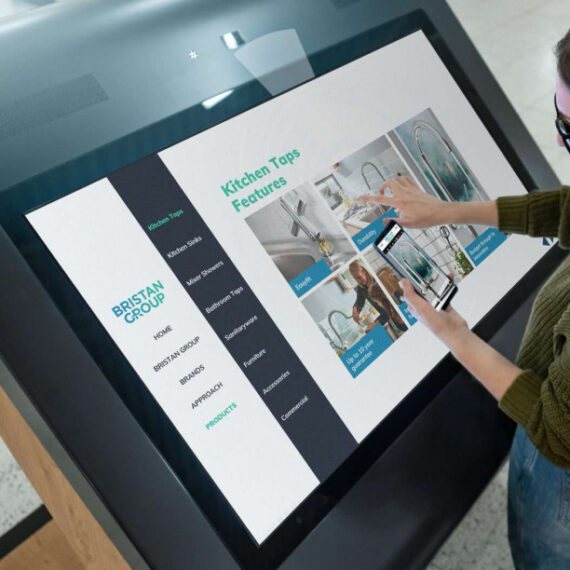
An interactive display is a large format digital screen that allows users to interact directly with content using touch, gestures, digital pens, or connected devices. Unlike traditional static screens or projectors, Interactive Displays integrate hardware and software to create a dynamic, collaborative environment.
Interactive displays are reinventing how people teach, present, brainstorm, and work together. They combine the power of high-resolution screens, touch responsiveness, and smart software tools — making content intuitive, engaging, and immersive.
Core Features of Interactive Display
Interactive Display are designed to bring together advanced visual performance, intuitive touch technology, and powerful collaboration tools into one seamless solution. Below is a detailed look at the core features that make Interactive Displays an essential technology for modern environments.
1. Advanced Multi-Touch Technology
One of the most defining features of Interactive Displays is multi-touch capability. Unlike traditional touchscreens that allow only one point of interaction, Interactive Displays support multiple simultaneous touch points. This enables several users to write, draw, move objects, or annotate content at the same time.
This feature is especially valuable in:
- Classrooms where students collaborate on exercises
- Meeting rooms where teams brainstorm together
- Training sessions requiring group participation
Multi-touch technology enhances teamwork, improves engagement, and encourages real-time collaboration without interruption.
2. Ultra-High Resolution Display Quality
Interactive Displays typically offer 4K Ultra HD resolution, delivering crystal-clear images, sharp text, and vibrant colors. This high resolution ensures that content remains clearly visible even in large rooms or when viewed from a distance.
High-resolution displays are ideal for:
- Detailed presentations and reports
- Technical drawings and diagrams
- Medical images and engineering visuals
- High-definition videos and multimedia content
The result is a visually immersive experience that enhances understanding and communication.
3. Built-In Digital Whiteboarding & Annotation Tools
Interactive Display include integrated whiteboarding software that allows users to write, draw, highlight, and annotate directly on the screen. Whether using a finger, stylus, or digital pen, users can mark up content naturally and smoothly.
Key advantages include:
- Writing over presentations, PDFs, images, and web pages
- Saving annotated content for later use
- Sharing notes instantly with participants
- Replacing traditional whiteboards and flip charts
This feature simplifies idea sharing and documentation, making meetings and lessons more productive.
4. Wireless Screen Sharing & Device Connectivity
Modern Interactive Display support wireless screen sharing, allowing users to connect laptops, tablets, and smartphones without cables. With just a few clicks, users can mirror their device screens onto the Interactive Displays.
This feature supports:
- Faster meeting setup
- Seamless presenter switching
- BYOD (Bring Your Own Device) environments
- Cleaner, cable-free meeting spaces
Interactive Displays also include multiple physical connection options such as HDMI, USB, USB-C, and DisplayPort for maximum compatibility.
5. Gesture Recognition & Intuitive Navigation
Interactive Displays recognize common gestures such as:
- Pinch to zoom
- Swipe to navigate pages
- Drag and drop objects
- Rotate and resize content
These familiar gestures make the displays easy to use, even for first-time users. The interface feels natural and intuitive, reducing the learning curve and increasing adoption across all age groups.
6. Integrated Collaboration Software
Many Interactive Displays come with built-in collaboration and productivity software. These tools support brainstorming, diagram creation, file sharing, and cloud-based collaboration.
Common software capabilities include:
- Multi-user whiteboarding
- Sticky notes and mind mapping tools
- Cloud storage integration
- Exporting content in multiple formats
This software transforms the display into a collaborative workspace rather than just a presentation screen.
7. Video Conferencing & Remote Collaboration Support
Interactive Displays are increasingly designed to support hybrid work and remote learning environments. They integrate easily with popular video conferencing platforms such as Zoom, Microsoft Teams, and Google Meet.
Features include:
- Real-time screen annotation during calls
- Shared digital whiteboards for remote participants
- Camera, microphone, and speaker integration
- Seamless collaboration between in-room and remote users
This makes Interactive Displays ideal for modern offices, training centers, and educational institutions.
8. Durable, Commercial-Grade Touch Surface
Interactive Displays are built with toughened, anti-glare glass designed for continuous, heavy use. The surface is scratch-resistant, impact-resistant, and easy to clean.
This durability makes them suitable for:
- Schools and universities
- Public spaces
- Corporate offices
- Retail environments
The anti-glare coating ensures clear visibility even under bright lighting conditions.
9. Support for Annotation Over Any Source
A powerful feature of Interactive Displays is the ability to annotate over any input source. Users can draw or write over:
- Live presentations
- Videos
- Websites
- Documents
- Camera feeds
This allows presenters and educators to explain concepts visually without switching applications, keeping sessions smooth and engaging.
10. USB-C One-Cable Connectivity
Many modern Interactive Displays support USB-C connectivity, allowing a single cable to handle:
- Video transmission
- Touch interaction
- Data transfer
- Device charging
This simplifies setup, reduces cable clutter, and improves convenience — particularly in fast-paced meeting and training environments.
Benefits of Interactive Displays
Interactive Displays deliver far more than visual appeal. They transform how people communicate, collaborate, learn, and make decisions. Across education, corporate, healthcare, retail, and public sectors, Interactive Displays are redefining efficiency and engagement. Below is a comprehensive breakdown of the key benefits that make Interactive Displays an essential modern technology.
1. Increased Engagement and Audience Participation
One of the most significant benefits of Interactive Displays is their ability to dramatically increase engagement. Unlike traditional screens or projectors that encourage passive viewing, Interactive Displays invite active participation.
Users can touch, write, draw, zoom, and manipulate content in real time. This hands-on interaction keeps audiences focused and involved, whether they are students in a classroom, employees in a meeting, or visitors at an exhibition.
Higher engagement leads to:
- Better understanding of content
- Improved retention of information
- More dynamic discussions
- Active participation rather than passive observation
Interactive Displays turn viewers into contributors.
2. Enhanced Collaboration and Teamwork
Interactive Displays create a shared digital workspace where multiple users can collaborate simultaneously. Team members can brainstorm ideas, annotate documents, and visually organize thoughts together on a single screen.
This is especially valuable in:
- Corporate brainstorming sessions
- Project planning meetings
- Design reviews
- Training workshops
- Strategy discussions
By allowing multiple inputs at the same time, Interactive Display encourage inclusivity and teamwork, ensuring everyone can contribute effectively.
3. Improved Productivity and Efficiency
Interactive Displays streamline workflows by combining multiple tools into one device. They replace whiteboards, flip charts, projectors, and printed documents — reducing setup time and eliminating unnecessary interruptions.
Benefits to productivity include:
- Faster meeting start times
- Instant access to files and content
- Quick switching between presenters
- Ability to save and share notes immediately
Meetings become more focused, decisions are made faster, and time is used more efficiently.
4. Better Learning Outcomes in Education
In educational environments, Interactive Display significantly improve learning experiences. Teachers can deliver lessons using visuals, videos, simulations, and live annotations, catering to different learning styles.
Key educational benefits include:
- Improved student engagement
- Interactive lessons that encourage participation
- Better understanding of complex concepts
- Support for visual, auditory, and kinesthetic learners
- Digital storage and sharing of lesson materials
Interactive Displays make learning more inclusive, interactive, and effective.
5. Supports Hybrid and Remote Collaboration
As remote and hybrid working models become more common, Interactive Displays play a critical role in bridging the gap between in-person and remote participants.
With integrated video conferencing and collaboration tools, Interactive Displays allow:
- Remote participants to see and interact with shared content
- Real-time annotation during online meetings
- Seamless collaboration regardless of location
This ensures equal participation for both in-room and remote users, enhancing communication and inclusivity.
6. Simplifies Technology Use for All Users
Interactive Display are designed to be intuitive and user-friendly. Familiar touch gestures — similar to smartphones and tablets — make them easy to use for people of all ages and technical skill levels.
This ease of use results in:
- Minimal training requirements
- Faster adoption across teams
- Reduced dependence on IT support
- Increased confidence among users
Technology becomes an enabler rather than a barrier.
7. Versatility Across Multiple Applications
One of the strongest advantages of Interactive Displays is their versatility. A single interactive display can be used for multiple purposes across different departments and industries.
Examples include:
- Teaching and training
- Business presentations
- Video conferencing
- Digital signage
- Interactive kiosks
- Product demonstrations
This flexibility maximizes return on investment and allows organizations to adapt the display to evolving needs.
8. High-Quality Visual Communication
With 4K Ultra HD resolution and superior brightness, Interactive Displays deliver clear and professional visual communication. Text remains sharp, images are vivid, and videos play smoothly.
High-quality visuals help:
- Improve clarity of presentations
- Reduce miscommunication
- Enhance professional image
- Support detailed technical or medical visuals
Clear visuals lead to clearer understanding.
9. Cost Savings Over Time
Although Interactive Displays are a long-term investment, they often reduce costs over time by replacing multiple technologies.
Cost-saving benefits include:
- Eliminating projector bulb replacements
- Reducing printing and paper usage
- Lower maintenance requirements
- Fewer additional devices needed
Over their lifespan, Interactive Displays often prove more cost-effective than traditional presentation tools.
10. Environmentally Friendly Solution
Interactive Displays support sustainability initiatives by reducing paper waste and energy consumption. Digital collaboration reduces the need for printed documents, while energy-efficient panels help lower electricity usage.
Environmental benefits include:
- Reduced paper consumption
- Lower carbon footprint
- Support for green building standards
This makes Interactive Displays an eco-conscious choice for modern organizations.

Uses of Interactive Displays
Interactive Displays are highly versatile solutions designed to adapt across industries and environments. Their ability to combine touch interaction, high-resolution visuals, collaboration tools, and digital connectivity makes them suitable for a wide range of practical applications. From classrooms and boardrooms to healthcare facilities and public spaces, Interactive Displays redefine how information is shared and experienced.
Below is a detailed exploration of the most common and impactful uses of Interactive Displays.
1. Education and Academic Institutions
Interactive Displays have become a cornerstone of modern education, replacing traditional chalkboards and projectors with immersive, digital learning tools.
Classroom Teaching
Teachers can:
- Deliver interactive lessons using multimedia content
- Write and draw directly on lesson materials
- Highlight key points in real time
- Save and share class notes digitally
Students benefit from hands-on participation, improved engagement, and better comprehension of complex concepts.
Collaborative Learning
Interactive displays support group activities such as:
- Problem-solving exercises
- Group presentations
- Interactive quizzes
- Brainstorming sessions
Multiple students can interact with the display simultaneously, fostering teamwork and critical thinking.
Distance Learning and Hybrid Classrooms
With built-in video conferencing and screen sharing, Interactive Displays enable seamless remote teaching. Teachers can interact with both in-class and remote students equally, creating inclusive learning environments.
2. Corporate Offices and Meeting Rooms
In corporate environments, Interactive Displays significantly enhance communication, collaboration, and decision-making.
Business Presentations
Executives and presenters can:
- Interact with slides dynamically
- Annotate charts and reports live
- Zoom into key data points
- Switch presenters instantly
This makes meetings more engaging and productive.
Team Collaboration and Brainstorming
Interactive Displays serve as digital whiteboards where teams can:
- Brainstorm ideas visually
- Create flowcharts and diagrams
- Organize project plans
- Save and revisit discussions
They eliminate the need for physical whiteboards and ensure no ideas are lost.
Video Conferencing and Hybrid Meetings
Interactive Displays integrate seamlessly with platforms like Microsoft Teams, Zoom, and Google Meet, allowing:
- Shared annotations during meetings
- Equal participation for remote and in-room teams
- Enhanced collaboration across locations
3. Training Centers and Corporate Learning
Interactive Displays are widely used in training environments to improve knowledge retention and engagement.
Employee Training Programs
Trainers can deliver interactive sessions that include:
- Visual demonstrations
- Real-time annotations
- Interactive exercises
- On-screen simulations
This approach improves understanding and accelerates learning.
Skill Development Workshops
Interactive Displays enable hands-on learning for technical, safety, and operational training, allowing participants to interact directly with content instead of passively observing.
4. Healthcare and Medical Facilities
Healthcare environments require clear communication, accuracy, and collaboration — all of which Interactive Displays support effectively.
Medical Training and Education
Interactive Displays are used for:
- Medical presentations
- Anatomy demonstrations
- Clinical training sessions
- Collaborative case discussions
High-resolution visuals help professionals analyze complex medical data accurately.
Patient Education
Doctors and healthcare staff can use Interactive Displays to:
- Explain procedures visually
- Review medical images with patients
- Improve patient understanding and trust
This enhances communication and patient satisfaction.
5. Retail and Commercial Spaces
Interactive Displays are transforming customer engagement in retail environments.
Product Showcases
Retailers use Interactive Displays to:
- Display digital catalogs
- Provide detailed product information
- Demonstrate features through videos
- Enable self-guided exploration
Customers can interact with content at their own pace, increasing engagement and purchase confidence.
Wayfinding and Information Kiosks
Interactive Displays act as digital kiosks to help customers:
- Navigate large shopping areas
- Access store directories
- Find promotions and offers
6. Government, Municipal, and Public Sector
Government institutions use Interactive Displays to modernize services and improve public engagement.
Public Information Systems
Interactive Displays provide:
- Public announcements
- Emergency information
- Interactive service directories
This improves accessibility and communication with the public.
Meeting and Council Chambers
Government bodies use interactive displays for:
- Agenda presentations
- Policy discussions
- Data visualization
- Remote participation
This supports transparency and informed decision-making.
7. Events, Exhibitions, and Trade Shows
Interactive Displays are powerful tools for creating immersive experiences at events.
Exhibitions and Museums
Museums and exhibitions use interactive displays to:
- Deliver interactive storytelling
- Provide educational content
- Allow visitor interaction with exhibits
This transforms static displays into engaging experiences.
Trade Shows and Corporate Events
At trade shows, Interactive Displays help:
- Demonstrate products dynamically
- Engage visitors with interactive content
- Collect leads and feedback
They attract attention and enhance brand presence.

Why Choose Axle Systems for Interactive Displays?
Choosing the right Interactive Displays is only one part of the equation. Selecting the right technology partner is equally important. At Axle Systems, we go beyond supplying hardware — we deliver complete, reliable, and future-ready interactive display solutions tailored to your needs.
Our expertise, customer-centric approach, and commitment to quality make Axle Systems a trusted choice for organizations across education, corporate, healthcare, retail, and public sectors.
1. Trusted Supplier of High-Quality Interactive Displays
Axle Systems is a reliable supplier of premium interactive display solutions, sourced from globally recognized manufacturers. We carefully select products that meet international quality standards, ensuring exceptional performance, durability, and long-term reliability.
Our Interactive Displays portfolio includes:
- High-resolution 4K interactive panels
- Multi-touch collaborative displays
- Commercial-grade interactive screens
- Education and corporate-focused solutions
Every product we supply is tested to deliver consistent performance in real-world environments.
2. Industry Expertise and Technical Knowledge
With extensive experience in audiovisual and interactive technology, Axle Systems understands the unique challenges faced by different industries. Our team has deep technical knowledge and hands-on expertise, allowing us to recommend the most suitable solutions — not just the most expensive ones.
We take time to understand:
- Your application requirements
- Room size and layout
- User interaction needs
- Budget and scalability goals
This consultative approach ensures you receive a solution that delivers maximum value.
3. Customized Solutions, Not One-Size-Fits-All
At Axle Systems, we believe every organization is unique. That’s why we provide customized interactive display solutions rather than generic packages.
Our customization includes:
- Selecting the right screen size and model
- Integrating compatible software and peripherals
- Designing solutions for classrooms, boardrooms, or public spaces
- Adapting systems for future expansion
This ensures your Interactive Displays fits perfectly into your environment and workflow.
4. End-to-End Integration and Installation Services
We provide complete end-to-end services, ensuring a smooth and hassle-free experience from start to finish.
Our services include:
- Site assessment and technical evaluation
- System design and configuration
- Professional installation and calibration
- User training and handover
Our certified technicians ensure that every interactive display is installed correctly, optimized for performance, and ready for immediate use.
5. Seamless Integration with Existing Systems
Axle Systems specializes in integrating Interactive Displays with your existing infrastructure. Whether you are upgrading from traditional projectors or enhancing an existing AV setup, we ensure seamless compatibility.
We integrate Interactive Displays with:
- Video conferencing platforms
- Audio systems and microphones
- Control systems
- Network and IT infrastructure
This reduces disruption and protects your existing investments.
6. Reliable After-Sales Support and Maintenance
Our relationship with clients doesn’t end after installation. Axle Systems provides comprehensive after-sales support to ensure long-term performance and peace of mind.
Our support services include:
- Technical assistance and troubleshooting
- Preventive maintenance
- Software updates and system optimization
- Warranty and replacement support
We are committed to keeping your Interactive Displays running smoothly throughout their lifecycle.
7. Future-Ready and Scalable Technology
Technology evolves rapidly, and Axle Systems ensures your investment remains relevant. We supply Interactive Displays that support future upgrades, software updates, and expansion.
Benefits include:
- Compatibility with evolving collaboration tools
- Ability to add accessories and peripherals
- Long-term usability and scalability
This future-ready approach protects your investment and supports long-term growth.
8. Competitive Pricing with Excellent Value
Axle Systems offers competitive pricing without compromising on quality. Our strong supplier relationships allow us to provide cost-effective solutions tailored to your budget.
We focus on:
- Transparent pricing
- High return on investment
- Long-term value rather than short-term savings
Our goal is to deliver the best possible solution at the best possible value.
9. Strong Focus on Customer Satisfaction
Customer satisfaction is at the core of everything we do. We take pride in building long-term relationships based on trust, reliability, and consistent performance.
Our approach includes:
- Clear communication at every stage
- Timely project delivery
- Responsive customer support
- Honest recommendations
We measure our success by the success of our clients.
10. Proven Track Record Across Multiple Sectors
Axle Systems has successfully delivered Interactive Displays solutions for:
- Educational institutions
- Corporate offices and boardrooms
- Training centers
- Healthcare facilities
- Government and public sector organizations
This multi-sector experience enables us to apply best practices and deliver proven solutions regardless of industry.
Contact Axle Systems
Ready to explore Interactive Displays for your space? Our team is here to help you choose the perfect solution, assist with installations, and offer ongoing support.
Phone: +974 44682391/77443731
Email: info@axlesys.com
Website: www.axlesys.com
Let’s transform the way you present, teach, and collaborate.

Common FAQs about Interactive Displays
Here are answers to some of the most frequently asked questions about interactive displays:
Q1 What is an interactive display?
A: An interactive display is a large touchscreen monitor that allows users to interact directly with digital content using touch, gestures, or digital pens. It replaces traditional whiteboards, projectors, and static displays with an interactive digital experience.
Q2 How do interactive displays work?
A: Interactive displays combine hardware (touch-sensitive screen, sensors) with embedded software (whiteboarding, presentation tools, device connection). Users touch or gesture on the screen to manipulate content, annotate documents, draw, and collaborate.
Q3 Are interactive displays easy to use?
A: Yes! Most models are designed with intuitive touch interfaces similar to tablets or smartphones. The learning curve is minimal, and many displays include user guides, tutorials, and on-screen prompts.
Q4 Can multiple users interact simultaneously?
A: Absolutely. Most interactive displays support multi-touch — meaning several users can write, draw, and navigate at the same time.
Q5 What sizes are available?
A: Interactive displays come in multiple sizes, typically ranging from 55 inches up to 98 inches and beyond for large-format installations. The choice depends on your room size, audience distance, and viewing needs.
Q6 Can I connect my laptop or tablet?
A: Yes — connect wirelessly or via USB-C, HDMI, or other standard ports. Wireless screen sharing makes it easy to mirror your device instantly.
Q7 Do interactive displays replace projectors?
A: In most cases, yes. Interactive displays offer brighter, clearer visuals, native touch interaction, and lower maintenance compared with projectors (no bulbs to replace, no calibration issues).
Q8 Are interactive displays suitable for remote meetings?
A: Definitely. Many interactive displays include built-in video conferencing tools, or integrate seamlessly with platforms like Zoom, Microsoft Teams, and Google Meet. They become shared workspaces for remote and in-room participants.
Q9 How long do interactive displays last?
A: With proper care and maintenance, high-quality interactive displays can last 7–10+ years depending on usage and environment.
Q10 Do I need special software?
A: Many interactive displays come with built-in collaboration and annotation software. Additional third-party apps can enhance features (e.g., advanced whiteboarding, graphic tools) depending on your needs.
Final Thoughts
Interactive Displays represent more than just technological advancement — they are a paradigm shift in how we communicate, collaborate, and interact with information. In today’s fast-paced world, where engagement, productivity, and creativity are paramount, organizations cannot rely on static tools alone. Interactive Displays bring content to life, transforming passive viewers into active participants and bridging the gap between ideas and execution.
Whether in classrooms, boardrooms, hospitals, retail spaces, or public areas, these displays empower users to think, share, and solve problems more efficiently. Educators can foster dynamic learning environments, students can engage in hands-on discovery, and teams can brainstorm in real time without limitations. Businesses can present complex data clearly, collaborate seamlessly with remote colleagues, and deliver immersive experiences to clients and customers alike.
Choosing the right interactive display is critical, and partnering with a trusted supplier like Axle Systems ensures that your investment delivers long-term value. We provide not just the technology, but the expertise to integrate these systems into your workflow, optimize their use, and maintain them with reliable support. From selection and installation to training and post-deployment assistance, our team ensures that every organization maximizes the potential of its Interactive Displays solution.
Moreover, Interactive Displays are future-ready. As digital collaboration, hybrid work, and interactive learning continue to evolve, these systems provide the flexibility and scalability needed to adapt to emerging technologies and shifting operational needs. They are a smart investment for institutions and businesses aiming to stay ahead of the curve, enhance engagement, and create memorable experiences for audiences of all kinds.
At Axle Systems, we believe that technology should be intuitive, accessible, and transformative. Interactive Displays exemplify this philosophy, combining innovative hardware, intelligent software, and user-centered design to deliver experiences that inspire, inform, and empower. Whether your goal is to educate, present, engage, or entertain, interactive displays are the gateway to a more connected, collaborative, and efficient future.
Take the step toward a smarter workspace, classroom, or public environment — explore our range of interactive displays, consult with our experts, and see how Axle Systems can help you unlock the full potential of digital interaction. The future of communication and collaboration is interactive, and it starts with a display that adapts to the way you think, work, and engage.