

Access Control Devices in Qatar
In a world where security, convenience, and operational efficiency matter more than ever, Access Control Devices (ACDs) sit at the heart of a modern security posture. Whether you run a corporate office, hospital, hotel, retail mall, airport, or a residential compound in Qatar, choosing the right access control system is a critical decision — one that protects people, assets, and reputation.
This comprehensive guide explains what Access Control Devices are, how they work, their benefits and features, common use cases, technical considerations, purchasing and installation tips, and frequently asked questions. Axle Systems — a leading supplier of Access Control Devices in Qatar — provides this guide to help you make an informed decision.
What is an Access Control Device?
An Access Control Devices is any hardware or software component used to manage, monitor, and restrict entry to a physical space or digital resource. The system enforces policies that determine who gains access, when, and under what conditions. Access Control Devices include card readers, biometric scanners (fingerprint, face, iris), keypad entry systems, mobile credential readers (Bluetooth/NFC), turnstiles, electric locks, controllers, and the management software that ties everything together.
At its core, an Access Control Devices authenticates identity (who you are) and authorizes actions (what you can access) — replacing or augmenting traditional keys with smarter, auditable, and centrally managed systems.
How Access Control Devices Work — The Basics
A typical access control workflow consists of three steps:
- Identification / Credential Presentation — The user presents credentials to a reader (card, fingerprint, face, mobile app).
- Authentication — The reader sends the credential to the controller or cloud service, which verifies its validity against a database.
- Decision & Enforcement — If allowed, the controller triggers an electric strike or magnetic lock to open the door (or unlock a turnstile), and logs the event. If denied, access is refused and the event is logged for audit.
Modern systems often integrate with other subsystems — CCTV, intrusion detection, HR databases, time & attendance, and visitor management — creating a unified security and operations platform.
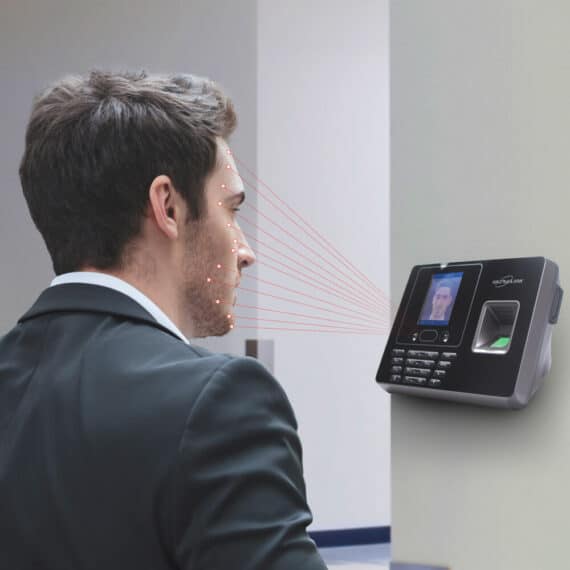
Key Types of Access Control Devices
Access Control Devices comprise several device types, each serving a specific role in securing and managing entry points. Understanding the different types of access control devices helps you design the right solution for your environment — balancing security, convenience, and cost.
Below are the most common and essential types of Access Control Devices used across industries in Qatar and globally:
1. Card & RFID Readers
Card readers are among the most widely used Access Control Devices. They rely on radio frequency identification (RFID) technology to communicate with access cards or key fobs. Users simply tap or wave their card near the reader to gain access.
Common technologies include:
- Proximity (125kHz): Affordable and reliable; ideal for offices and residential buildings.
- MIFARE & DESFire (13.56MHz): More secure smart card technologies supporting encryption.
- HID iCLASS: High-frequency readers offering advanced security features and encryption protocols.
Benefits:
- Contactless operation for fast entry.
- Easy issuance and revocation of cards.
- Compatible with existing building systems.
- Suitable for indoor and outdoor installations.
Applications:
Corporate offices, hospitals, universities, residential complexes, and government facilities.
2. Biometric Readers
Biometric Access Control Devices readers identify individuals based on unique physical or behavioral characteristics such as fingerprint, facial recognition, palm vein, or iris patterns. Since biometric data cannot be easily lost, stolen, or shared, this technology provides the highest level of security and accountability.
Popular biometric technologies:
- Fingerprint Scanners: Affordable and accurate for employee authentication.
- Facial Recognition Devices: Ideal for touchless access in high-traffic areas.
- Iris Scanners: Used in critical infrastructure and high-security environments.
- Palm Vein Scanners: Offers hygienic and contactless access verification.
Advantages:
- Eliminates need for cards or PINs.
- Non-transferable and unique to each user.
- Highly accurate and reliable even in demanding environments.
- Integration with attendance and HR systems.
Best suited for: Airports, data centers, hospitals, banks, and government buildings.
3. Keypad / PIN-based Systems
Keypad access systems require users to enter a Personal Identification Number (PIN) to gain access. They are simple, low-cost, and can be used as a standalone Access Control Devices method or combined with cards or biometrics for added security.
Features:
- Programmable PIN codes.
- Backlit keypads for low-light conditions.
- Tamper-resistant housings for outdoor use.
Advantages:
- Cost-effective for small installations.
- Easy to reprogram or change PINs.
- No need for physical credentials.
Ideal for: Small offices, storerooms, maintenance rooms, and secondary entrances.
4. Mobile Credential Readers
As smartphones become universal, mobile access control is revolutionizing how users interact with doors and gates. These readers use Bluetooth Low Energy (BLE) or Near Field Communication (NFC) to communicate securely with a user’s smartphone, eliminating the need for cards.
How it works:
The user installs a mobile credential app. When approaching the door, they can simply tap their phone, use proximity detection, or wave to unlock.
Benefits:
- Contactless and hygienic (no shared surfaces).
- Reduced credential management costs (no card printing).
- Enhanced convenience for employees and visitors.
- Remote credential distribution via cloud management systems.
Common in: Smart offices, hotels, universities, and coworking spaces.
5. Smart Locks & Electric Strikes
Smart locks and electric strikes are the physical mechanisms that secure or release the door. They are activated electronically by the Access Control Devices system once authentication is approved.
Types include:
- Magnetic Locks (Maglocks): Use electromagnets; suitable for glass or metal doors.
- Electric Strikes: Replace the mechanical strike plate on a door frame.
- Smart Deadbolts & Latches: Often used in residential or hospitality applications.
- Wireless Smart Locks: Connect via Wi-Fi or Zigbee and support mobile control.
Advantages:
- Secure and durable.
- Can be integrated with fire alarm and emergency exit systems.
- Suitable for wooden, metal, and glass doors.

Use cases: Hotels, commercial offices, residential apartments, and smart homes.
6. Controllers (Local & IP-based)
The controller is the “brain” of the access control system. It processes credentials received from readers, verifies permissions, and triggers the door mechanism to unlock or deny entry.
Types:
- Local Controllers: Installed on-site, storing data and decisions locally.
- IP-based Controllers: Connect via the network to enable centralized or cloud-based management.
Key features:
- Real-time access event logging.
- Backup power and memory for offline operation.
- Multiple input/output (I/O) ports for connecting readers, locks, alarms, and sensors.
Benefits:
- High reliability and speed.
- Scalable from single-door to enterprise-level deployments.
- Enhanced integration with CCTV and time attendance systems.
Used in: Corporate campuses, hospitals, factories, and government buildings.
7. Turnstiles & Speed Gates
Turnstiles and speed gates are physical barriers that regulate the flow of people entering or exiting secure areas. They are commonly integrated with Access Control Devices readers to ensure that only authorized users pass through.
Types:
- Tripod Turnstiles: Economical and compact for medium-traffic areas.
- Flap Barriers: Stylish and fast; often used in corporate lobbies.
- Swing Gates: Provide accessibility for wheelchairs or large equipment.
- Full-Height Turnstiles: High-security option for outdoor or restricted perimeters.
Advantages:
- Prevents tailgating and piggybacking.
- Seamless integration with RFID or biometric readers.
- Durable and suitable for high-traffic environments.
- Supports anti-pass back and real-time monitoring.
Common installations: Airports, metro stations, offices, universities, and stadiums.
8. Cloud-Based Access Management Platforms
In the era of digital transformation, cloud-based Access Control Devices are becoming increasingly popular. These platforms enable remote management of users, credentials, and access rights through web portals or mobile applications.
Key features:
- Centralized dashboard for multiple sites.
- Remote provisioning or revocation of credentials.
- Real-time monitoring and reporting.
- Integration with video surveillance, alarm systems, and HR software.
- Scalable subscription-based model.
Benefits:
- No need for on-site servers or complex IT infrastructure.
- Faster updates and reduced maintenance.
- Ideal for organizations with distributed offices or multiple branches.
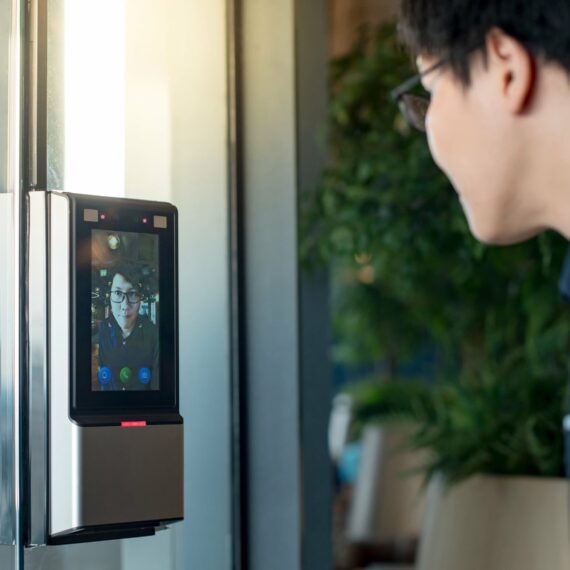
Key Features of Access Control Devices – Expanded Version
Access Control Devices are more than just door readers—they are intelligent security systems that integrate hardware, software, and policies to regulate access. Understanding the key features of these devices is essential for selecting the right solution. Here’s an in-depth look at the features that make modern Access Control Devices effective:
1. Multi-Type Credential Support
Modern access control devices support a variety of credentials to accommodate different security needs:
- Proximity/Smart Cards: Contactless cards are widely used in offices, hotels, and retail environments for secure yet convenient entry.
- Key Fobs: Small, portable devices that offer the same functionality as cards, often used for staff or frequent users.
- PIN/Code Access: Simple numeric codes entered on a keypad, ideal for areas requiring temporary access or cost-effective solutions.
- Mobile Credentials: Smartphones can act as credentials using NFC or Bluetooth Low Energy (BLE), allowing users to unlock doors without carrying physical cards.
- Biometrics: Fingerprint scanners, facial recognition cameras, and iris readers provide high security by using unique physical traits that cannot be shared or duplicated.
This multi-credential support ensures flexibility and allows organizations to implement a mix of security levels depending on the area being accessed.
2. Multi-Factor Authentication (MFA)
To enhance security, Access Control Devices often support multi-factor authentication, combining:
- Something you have (card or mobile credential)
- Something you know (PIN code)
- Something you are (biometric scan)
For high-security areas like server rooms, labs, or executive suites, MFA drastically reduces the risk of unauthorized access, even if a card is lost or stolen.
3. Real-Time Monitoring & Alerts
Access control devices communicate with central management software in real-time. This allows:
- Live tracking of who is entering or exiting the premises
- Instant notifications for unusual activity, such as forced entry, tampering, or door held open
- Immediate action, improving response times for security personnel
Real-time monitoring also ensures continuous protection, especially in sensitive facilities such as hospitals, government offices, or industrial plants.
4. Time-Based & Scheduled Access
Modern Access Control Devices allow administrators to set time-based access policies:
- Grant access only during office hours or specific shifts
- Schedule temporary access for contractors, cleaners, or visitors
- Automatically revoke credentials after a defined period
This feature ensures tighter control, prevents unauthorized use during off-hours, and reduces administrative overhead compared to manually managing keys or passes.
5. Customizable Access Roles & Privileges
Not all users need the same level of access. Access control devices enable role-based management, allowing:
- Staff to access specific floors or rooms according to their job function
- Temporary access for visitors or external contractors
- Restriction of sensitive areas, such as financial offices, IT server rooms, or laboratories
Administrators can easily adjust privileges remotely, ensuring the right people have the right access at the right time.
6. Integration with Other Security & Building Systems
Access Control Devices are part of a broader security ecosystem. They can integrate with:
- CCTV Cameras: Triggering video recording or live feeds when doors are accessed
- Alarm Systems: Activating alerts if a door is forced or left open
- Visitor Management Systems: Automatically logging visitor entries and issuing temporary credentials
- Turnstiles & Barriers: Controlling pedestrian and vehicle flow in secure areas
- Building Management Systems: Syncing with lighting, HVAC, and emergency protocols for enhanced automation
Integration ensures that security and operational systems work in harmony, providing centralized control and smarter facilities management.
7. Cloud-Based or Networked Management
Modern Access Control Device systems often feature cloud or IP-based management, providing benefits such as:
- Remote configuration and monitoring from anywhere
- Scalable solutions for multi-site or campus deployments
- Automatic software updates and security patches
- Centralised reporting and audit logs
Cloud-based systems are particularly useful for organizations with multiple offices, campuses, or facilities that require consistent access policies.
8. Detailed Reporting & Audit Trails
An important feature of access control devices is the ability to generate customizable reports:
- Who accessed which area, and at what time
- Failed access attempts or suspicious activity
- Occupancy trends and employee movement patterns
- Visitor logs for compliance or emergency management
These logs support regulatory compliance, internal audits, and security investigations, providing transparency and accountability.
9. Visitor & Contractor Management
Access Control Devices simplify the management of temporary users:
- Issue temporary credentials valid only for a few hours or days
- Track visitor movement within the facility
- Limit access to predefined zones
- Schedule pre-authorized access for contractors before arrival
This feature ensures visitors and contractors can complete their tasks safely without compromising the overall security of the premises.
10. Data Security & Encryption
Protecting credential data is critical:
- Devices support encryption for data stored on cards or transmitted over networks
- Biometric data is securely stored and cannot be easily cloned
- Regular software updates ensure protection against cyber threats
Secure access control devices protect both physical and digital assets, especially in high-security or sensitive environments.
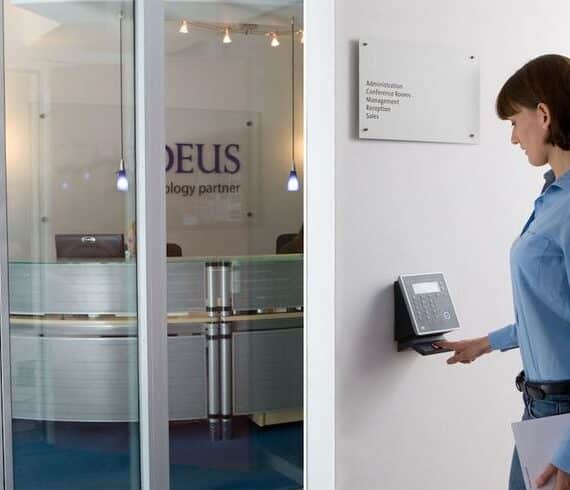
Uses & Applications of Access Control Devices – Expanded Version
Access Control Devices are versatile tools that serve a wide range of sectors. By regulating who can enter specific areas, when they can enter, and under what conditions, these devices not only enhance security but also improve operational efficiency. Below is an in-depth look at their applications across various industries:
1. Corporate Offices & Commercial Buildings
In modern offices, access control devices are critical for both security and workflow management:
- Executive Suites & Data Centers: Sensitive areas such as boardrooms, server rooms, and financial offices require multi-factor authentication for authorized personnel only.
- Staff Access Management: Different departments can have tailored access privileges, reducing risks of unauthorized entry.
- Temporary Access: Contractors, interns, and visiting consultants can be issued time-limited credentials, automatically expiring after their visit.
- Floor Access Control: Elevators can be integrated with access control, restricting floor access according to role or clearance level.
- Audit Trails & Monitoring: Track employee attendance patterns or access history for HR, security, or compliance purposes.
Example in Qatar: A multinational corporate office in West Bay might deploy fingerprint and card readers for staff, while visitors are issued temporary QR-based access, integrated with CCTV monitoring for enhanced safety.
2. Retail Outlets & Shopping Malls
Access Control Devices help retail businesses secure assets and streamline operations:
- Backroom & Stockroom Security: Restrict access to inventory areas to authorized personnel only.
- Cash Handling Areas: Limit access to cash offices and POS storage areas.
- Night-shift Staff Management: Grant temporary access to cleaners or night security personnel.
- Loss Prevention: Integrate with CCTV and alarms to monitor after-hours access and detect tampering or theft.
- Multi-location Management: For retail chains, access control systems can be centrally managed to ensure consistency across multiple stores.
Example in Qatar: Doha’s shopping malls can implement turnstile integration with employee ID cards, controlling access to maintenance areas while tracking working hours automatically.
3. Healthcare Facilities & Hospitals
Security and compliance are paramount in healthcare settings:
- Controlled Zones: Pharmacy storage, laboratories, ICU, radiology, and server rooms can have restricted access.
- Visitor Management: Issue temporary passes for patients’ relatives or contractors, limiting movement to approved areas.
- Regulatory Compliance: Maintain logs for sensitive data and patient safety areas.
- Emergency Protocols: Doors can be programmed to unlock automatically during emergencies for safe evacuation.
- Biometric Authentication: High-security zones can employ fingerprint or iris scanning to prevent unauthorized access.
Example in Qatar: Hamad Medical Corporation can deploy multi-factor access for ICU entrances, while visitors use temporary QR-based passes, integrated with real-time monitoring systems.
4. Residential Complexes & Gated Communities
Access Control Devices are increasingly popular in luxury and mid-tier residential developments:
- Main Gate & Lobby Security: Residents can use RFID cards, fobs, or mobile credentials for seamless entry.
- Amenity Access: Gyms, pools, parking garages, and private lounges can be restricted to residents only.
- Visitor & Delivery Management: Temporary credentials for visitors or delivery personnel, automatically expiring after use.
- Audit Trails: Track visitor logs, parking usage, and unusual access events for safety and security.
Example in Qatar: A high-end complex in Lusail City can integrate mobile credentials for residents and temporary QR codes for delivery staff, while linking to CCTV for monitoring.
5. Industrial & Manufacturing Facilities
Security in industrial settings protects personnel, equipment, and intellectual property:
- Restricted Production Zones: Only authorized personnel can access high-risk areas.
- R&D Labs & Prototype Rooms: Prevent theft or tampering by controlling access to sensitive equipment.
- Shift Management: Access Control Devices can align with work shifts to manage attendance and restrict after-hours entry.
- Integration with Turnstiles & Vehicle Gates: Manage both pedestrian and vehicular access within the facility.
- Safety Compliance: Integration with emergency systems ensures restricted areas can be evacuated quickly during incidents.
Example in Qatar: A manufacturing plant in Industrial Area 57 can use fingerprint readers at assembly zones, while temporary cards are issued to maintenance contractors.
6. Government & Defense Establishments
High-security environments require stringent access control:
- Multi-layered Security: Implement man-traps, turnstiles, and biometric verification for sensitive government offices.
- Clearance-based Access: Employees gain access only to areas matching their security clearance.
- Visitor & Contractor Management: Track and log temporary personnel movements.
- Integration with Surveillance: Combine access control with CCTV, alarms, and threat detection systems.
Example in Qatar: Government ministries or military facilities can deploy facial recognition for staff, while visitors are pre-registered and issued temporary QR passes.
7. Educational Institutions & Campuses
Schools, universities, and training centers benefit from access control to protect students, staff, and assets:
- Restricted Laboratories & Libraries: Control access to sensitive academic resources.
- Classroom & Facility Scheduling: Grant access based on class schedules or lab bookings.
- Visitor Management: Allow temporary access for guest lecturers, parents, or maintenance personnel.
- Emergency Response: Doors unlock automatically during fire drills or lockdown situations.
- Attendance Tracking: Access logs can integrate with attendance systems to monitor student or staff presence.
Example in Qatar: Qatar University can implement RFID cards for students and staff, controlling access to labs and administrative offices while maintaining a secure campus perimeter.
Why Choose Axle Systems as Your Access Control Devices Supplier in Qatar?
As a supplier committed to delivering advanced security solutions, Axle Systems offers a compelling proposition for clients in Qatar. Let us highlight why:
- Local Expertise & Experience: Axle Systems has an established presence in the Qatar market, with experience across residential, commercial, retail, industrial, and defense sectors.
- Comprehensive Solutions: Beyond just supplying devices, Axle Systems provides design, installation, integration, commissioning and maintenance of access control systems, ensuring end‑to‑end service.
- Quality Assurance: The company holds ISO certification and focuses on delivering high‑quality hardware, integration and support, ensuring your Access Control Devices deployment meets international standards.
- Wide Product & Brand Support: Whether you require card readers, mobile credentialing, biometric access, time‑based scheduling, turnstile integration, or advanced analytics, Axle Systems can provide devices from leading manufacturers and integrate them into your environment.
- Local Support & Service: With operations in Doha, Axle Systems can provide prompt installation, local support, service contracts, and maintenance—critical for mission‑critical security systems.
- Customized Solutions: Recognizing that each installation is unique, Axle Systems works with you to define access levels, user roles, schedules, visitor management workflows, and integration with your existing infrastructure.
- Future‑Ready & Scalable: With experience deploying cloud‑based systems, mobile credentials, and integration with building systems, Axle Systems positions you to scale as your organization grows or requirements evolve.
Contact Details:
- Address: Office #505, Building 24, Street 940, Zone 26, Al Bandary Building, Al Khalidiya Street, PO Box 200081, Doha, Qatar.
- Phone: +974 44682391/77443731
- Email: info@axlesys.com
- Website: www.axlesys.com
Frequently Asked Questions (FAQ) – Access Control Devices
Q1: What is the difference between an access control device and a traditional lock & key?
A: Traditional mechanical locks rely on physical keys and do not provide logging, scheduling, integration or remote management. Access control devices allow controlled entry/exit based on credentials (cards, biometrics, mobile), can log events, enable time‑based scheduling, integrate with other systems and can be managed centrally. Mechanical keys cannot easily be revoked or audited—credentials in access control systems can.
Q2: What types of credentials can be supported?
A: Typical credentials include proximity cards, smart cards, key fobs, PIN codes, mobile credentials (NFC/Bluetooth), biometrics such as fingerprint, facial recognition or iris scanning. The specific device must support the credential types you choose.
Q3: Can I schedule access—e.g., restrict someone to access only on weekdays from 8 am to 6 pm?
A: Yes. A key feature of modern access control devices is time‑based or schedule‑based access. You can configure doors/areas so that certain credentials work only during specific times, days, or for temporary access (e.g., contractors) and automatically expire or deactivate.
Q4: How do access control devices integrate with other security systems?
A: They often integrate with surveillance cameras (CCTV), alarm systems, visitor management software, building management systems, turnstiles/electronic barriers, and sometimes with HR/time‑attendance systems. Integration enables comprehensive monitoring, shared data and improved responsiveness to security events.
Q5: Are cloud‑based access control devices better than on‑premise systems?
A: Cloud‑based systems offer benefits: remote management, software updates, reduced on‑site server infrastructure, cost‑efficiency, scalability and often faster access provisioning. However, considerations for internet reliability, security and compliance must be addressed. Legacy on‑premise systems may still be used where local control or network independence is required.
Q6: What is the process for selecting and installing an access control device/system?
A: Typical steps include:
- Assessing physical layout and defining zones/areas/doors.
- Understanding user roles, credential types, access schedules and visitor/contractor workflows.
- Choosing hardware (readers, controllers, locks) and software platform.
- Planning for integration with other systems (CCTV, alarms, building management).
- Installing hardware, configuring software, enrolling credentials/users.
- Testing, commissioning and training staff on usage and administration.
- Establishing maintenance, backup, reporting and review processes.
Q7: How many doors or users can a modern access control device/system handle?
A: It depends on the hardware and system architecture. Many systems are scalable—supporting dozens to thousands of doors and tens of thousands of credentials. The supporting software, network infrastructure and controllers determine the limits. Ensure your planned system can scale for future growth.
Q8: What happens if a credential is lost or an employee leaves?
A: You can immediately deactivate that credential, update permissions centrally and issue a replacement. The system log shows the history of credential use, and using scheduled or temporary credentials ensures former users cannot access after leaving. This is a major advantage over mechanical keys. Access Control Devices
Q9: Are biometric access control devices safe, and do they comply with privacy requirements?
A: Yes—when implemented correctly. Biometric systems use unique human traits (fingerprint, facial, iris) that are difficult to duplicate. However, data protection is critical: biometric data must be stored securely (encrypted), and access/logging must respect privacy laws and organisational policies. You should also provide alternative credentials for users who cannot use biometric modalities.
Q10: What maintenance or future proofing should I consider?
A: Look for devices and systems that support firmware/software updates, open architecture (to avoid vendor lock‑in), cloud or hybrid deployment options, and integration with future building automation/security systems. Regular audits of permissions and access logs, backup processes, and hardware lifecycle management are also important.
Conclusion
In conclusion, Access Control Devices are central to modern security infrastructures, offering substantial benefits in security, operational efficiency, compliance, integration, and scalability. Whether you are securing a small office or a large mixed‑use facility in Qatar, the right device and system architecture can make a decisive difference.
At Axle Systems, we understand the unique demands of the Qatari market—from climatic challenges to regulatory landscapes, to integration with sophisticated building systems. We are fully equipped to supply, install, and support Access Control Devices tailored to your environment, sector, and business goals.
Take the next step: reach out to us today for a free consultation.
Contact us at: +974 44 68 2391 or +974 77 44 3731
Email: info@axlesys.com
Visit us: Office #505, Building 24, Street 940, Zone 26, Al Bandary Building, Al Khalidiya Street, PO Box 200081, Doha, Qatar.
Let’s design an Access Control Devices that protects your people, assets, and operations—while supporting your future growth.